
Updated September 2026 | 11 min read

Space Case builds its grinders around precision-machined aluminum and a diamond tooth grinding system, and its 4-piece models add a medical grade stainless steel pollen screen below that. Those aren’t the same kind of surface, and they shouldn’t be cleaned the same way.
This guide covers how to clean a Space Case grinder piece by piece: recovering loose material first, cleaning the teeth and grinding chamber, handling the pollen screen carefully, cleaning the lower collection chamber, and what to do around the nylon O-ring. Where Space Case’s own material specifies something, this guide says so directly. Where it doesn’t, that’s stated too, rather than presenting general cleaning advice as if it came from the manufacturer.
Table of Contents
How Is a Space Case Grinder Built?
Space Case has been machining grinders in San Clemente, California since 1998, built from what the company describes on its product pages as American milled aircraft grade aluminum.
The grinding mechanism uses opposing bi-directional diamond teeth. Space Case’s technical page describes centering wedges around the outer edge of the chamber, which push material back toward the center so the diamond teeth keep working it until the texture is right.
Rotation runs on nylon O-rings, which Space Case markets for smooth and precise turning. The lid closes with neodymium rare earth magnets, which the company describes as sourced to industry standards and ROHS compliant.

On 4-piece models, ground material that falls through the transition holes meets a medical grade T-316 stainless steel screen, pressed into place with what Space Case calls a 360-degree tapered locking press for firm tension. What passes through the screen lands on a collector plate, and the included tool that matches its radius is listed on Space Case’s product pages as a pollen scraper (Space Case’s technical page also refers to this piece as a pollen pick).
Why this matters for cleaning: the aluminum body, teeth, and centering wedges are solid machined metal and can handle more direct cleaning. The screen is a pressed, tensioned piece of fine mesh, and it can’t take the same scraping or force without risking damage.
Space Case 2-Piece vs. 3-Piece vs. 4-Piece Cleaning
2-piece. Grinding chamber with diamond teeth and centering wedges, plus the lid. Cleaning is mostly about the teeth and chamber.
3-piece. Adds a lower section. Space Case’s own product listings don’t include a pollen screen on the 3-piece line, so this bottom section functions as a collection chamber for ground material rather than a separate pollen-sifting stage.
4-piece. Adds the medical grade T-316 stainless steel pollen screen and the collector plate underneath it, along with the included pollen scraper. This is the configuration that needs the most component-specific care, since the screen requires gentler handling than the rest of the grinder.
Not every Space Case model shares identical construction. Check the specifications for your specific size and configuration if you’re unsure what it includes.
Why Does a Space Case Grinder Need Cleaning?
Ground material and fine particles collect in a few predictable spots:
- Loose material left in the chamber after grinding
- Fine particles around the diamond teeth and centering wedges
- Sticky residue on the grinding surfaces
- Buildup along contact surfaces, including around the O-ring
- Pollen or kief accumulating on and around the screen and collector plate, on 4-piece models
Cleaning is routine maintenance. It’s not something that fixes every performance issue, so don’t assume a grinder that feels different is automatically dirty.
Signs Your Space Case Grinder May Need Cleaning
- Visible residue on the diamond teeth
- Sticky buildup in the grinding chamber
- Material collected around edges or contact surfaces
- Rotation that feels different, paired with visible residue (rather than resistance alone)
- A visibly loaded or obstructed pollen screen on 4-piece models
- A noticeable amount of loose material you’d want to collect before a deeper clean
How to Clean a Space Case Grinder Step by Step
Space Case’s current published material describes the grinder’s construction in detail but doesn’t lay out a specific cleaning solvent, soak time, or method. The steps below are general cleaning guidance built around that construction, not a manufacturer-published procedure. Where Space Case does specify something, it’s called out directly.
Step 1: Disassemble the Grinder
Separate the sections your specific model is designed to come apart into. Don’t pry apart anything that isn’t meant to be user-removable.
Step 2: Recover Loose Material First
Before brushing, wiping, or introducing any liquid, check the chamber and any accessible surfaces for loose material worth keeping. Once you start cleaning, that material is largely gone.
Step 3: Collect Loose Material From Solid Surfaces
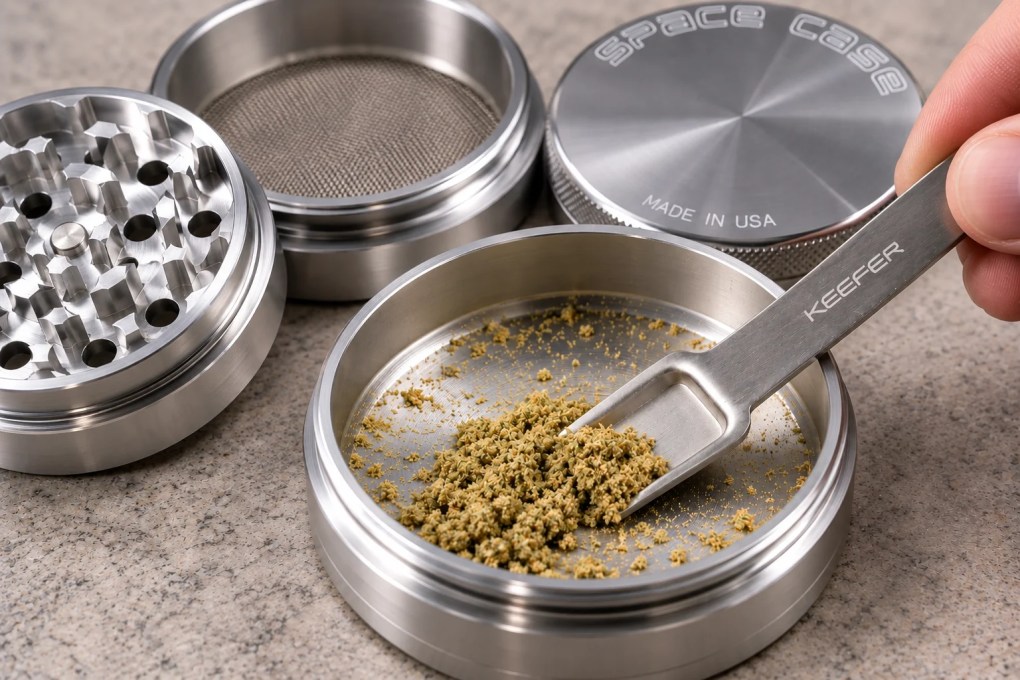
An optional precision scraper or scoop can help here. The Keefer Scraper Mini is one option, useful on accessible solid surfaces like the chamber floor or the lower collection chamber. Keep it away from the stainless steel pollen screen — that’s a job for a soft brush, covered in Step 6.
Step 4: Brush the Teeth and Grinding Chamber
Start with a clean, soft brush to clear loose debris from the diamond teeth, the corners around them, the centering wedges, and the accessible chamber surfaces. This is solid machined aluminum, so it can tolerate reasonable brushing, but there’s no need for excessive force.
Step 5: Clean Contact Areas Where Applicable
Wipe down accessible mating surfaces where sections meet. Don’t confuse the nylon O-ring with a threaded joint; it’s a separate rotation component and gets its own handling, covered further down.
Step 6: Clean the Pollen Screen Gently
On 4-piece models, this is the step that matters most. Use a soft brush, and keep it light. Don’t stab the mesh, don’t force a metal tool through the openings, and don’t use the Keefer Scraper or any similarly rigid tool on the screen itself. A pressed, tensioned screen like Space Case’s T-316 stainless steel screen holds its shape by design, and aggressive handling is what compromises that, not gentle brushing.

Step 7: Clean the Lower Collection Chamber
Recover any loose material sitting in the collector plate area first, then clean the solid surface underneath. This is another appropriate spot for the Keefer Scraper if you want a precise tool for gathering fine material before wiping the chamber down.
Step 8: Address Stubborn Sticky Residue
Space Case’s current first-party material reviewed for this guide doesn’t publish a detailed solvent-cleaning protocol for its grinders. It doesn’t specify isopropyl alcohol, a concentration, a soak time, or any other solvent method.
If you choose to use isopropyl alcohol or a similar solvent as general grinder-maintenance practice, treat it as that: general practice, not a Space Case instruction. Apply it to a cloth for the solid aluminum surfaces rather than assuming the O-ring, magnet, or screen should be soaked in it, since Space Case doesn’t document how those components hold up to solvent exposure.
Step 9: Dry Completely
Every component should be fully dry before you put the grinder back together. Space Case doesn’t publish a specific drying time, so this guide doesn’t invent one.
Step 10: Reassemble and Check Rotation
Put the normally removable sections back together and confirm everything seats and turns the way it should. Space Case doesn’t document a lubricant for the O-ring or threads, so this guide doesn’t recommend adding one.
How to Clean Space Case Grinder Teeth
The diamond teeth and centering wedges are solid aluminum components, so they can be cleaned differently from the fine stainless-steel pollen screen.
Recover loose material first, then dry brush the teeth and the chamber around them. Pay attention to the base of each tooth and the corners near the centering wedges, since that’s where fine material tends to pack in. If you use a cloth with a solvent for stuck residue, wipe rather than scrub aggressively.
How to Clean a Space Case Pollen Screen
Space Case’s 4-piece models use what the company calls a medical grade T-316 stainless steel pollen screen. If you’ve used other grinders, you may know this type of component as a kief screen; Space Case’s own terminology for it is pollen screen, and that’s the term used throughout this guide.
Cleaning hierarchy for the screen:
- Recover loose material first, ideally with a precision tool on the collector plate below rather than on the screen itself.
- Brush gently with a soft brush to clear loose buildup from the mesh.
- Inspect the screen for anything that didn’t come loose with brushing.
- Go further only with care. Space Case’s material doesn’t publish a deeper cleaning method for the screen specifically, so treat any additional cleaning as careful, general practice rather than a documented procedure.
Don’t scrape the screen with the Keefer Scraper or any other rigid tool, and don’t try to clear clogged openings by poking through them.
Space Case also warns that careless storage of the included pollen pick can damage the screen. Before threading the grinder back together, make sure the pollen pick is lying completely flat.
How to Clean the Space Case Pollen/Kief Chamber
The collector plate sits below the screen on 4-piece models, and it’s a solid surface rather than mesh, so it’s handled differently.
Recover fine material from the plate before wiping it down. This is a natural spot to use the Keefer Scraper as an optional collection tool, since the plate is exactly the kind of accessible solid surface it’s built for. The distinction to keep in mind throughout: the screen gets a soft brush, and the solid collection chamber is fine for an optional scraper or scoop.
How to Clean Around the Space Case Nylon O-Ring
Space Case documents nylon O-rings as part of what keeps rotation smooth and precise. Beyond that description, the company’s current material doesn’t publish a cleaning, lubrication, or replacement-interval procedure for it.
The conservative approach: remove loose contamination from around the O-ring carefully, without solvents or oils this guide can’t verify are appropriate for nylon. If the O-ring looks damaged, worn, or is missing, Space Case sells O-ring accessories by size on its site.
Can You Use Isopropyl Alcohol on a Space Case Grinder?
Space Case’s current first-party material reviewed for this guide doesn’t provide a detailed official isopropyl alcohol cleaning protocol. It doesn’t specify a concentration, and it doesn’t describe a soak method or duration.
If you independently choose to use isopropyl alcohol, don’t treat that method as a Space Case recommendation, and avoid assuming every component should receive the same solvent exposure. Be more cautious with the black anodized finish, the nylon O-ring, the magnet, and the pollen screen than with the solid aluminum teeth and chamber.
Can You Soak a Space Case Grinder?
Space Case doesn’t publish an official soaking protocol. A more conservative, component-by-component approach is the safer path: solid aluminum pieces can generally tolerate more direct cleaning, while the screen, O-ring, and magnet assembly warrant more careful, targeted handling rather than a blanket soak.
Can You Put a Space Case Grinder in the Dishwasher?
Space Case’s current material doesn’t provide dishwasher guidance one way or the other. Since there’s no manufacturer approval for it, controlled hand cleaning is the more reliable choice.
How to Clean a Black Anodized Space Case Grinder
Space Case describes its black models as anodized, and states that anodizing increases strength. That’s a statement about strength, not a documented claim about chemical resistance or cleaning compatibility.

Use non-aggressive cleaning methods on the exterior finish. A soft brush and a gentle wipe are enough for normal residue; avoid abrasive scraping, and don’t use the Keefer Scraper as a tool for working on the exterior finish.
Why Is My Space Case Grinder Hard to Turn?
A few things worth checking:
- Visible sticky residue in the grinding chamber
- Debris around contact surfaces where sections meet
- Contamination around the O-ring area
- Improper reassembly, where a section isn’t seated correctly
Cleaning can resolve resistance caused by buildup, but it isn’t a fix for everything. If routine cleaning doesn’t resolve the problem, Space Case support is the right next step. The company currently offers a limited lifetime warranty against manufacturing defects, subject to its warranty terms and proof-of-purchase requirements.
Recover Loose Material Before Cleaning Your Space Case
Loose material sitting in the chamber or on the collector plate is easy to lose once you start brushing or wiping. For more on this same principle applied across grinder types, see our guides on how to collect kief from a grinder and how to clean a grinder without losing kief.
Space Case Maintenance Pick: Keefer Scraper®
The Keefer Scraper® is a stainless-steel multi-tool for collecting loose material, scooping fine particles, and transferring them into a storage container. It’s an optional accessory for that job on accessible solid surfaces.
Space Case 4-piece grinders already include a matching pollen scraper sized to the collector plate for that specific job. The Keefer Scraper isn’t a substitute for that included tool or for the soft-brush method the screen itself needs.

The Keefer Scraper is an independent accessory and is not affiliated with, sponsored by, or endorsed by Space Case.
How Often Should You Clean a Space Case Grinder?
Space Case doesn’t publish a specific cleaning interval. What’s practical is condition-based: clean when visible buildup starts interfering with normal use, and check the screen on 4-piece models before residue becomes heavy enough to affect collection.
Space Case Grinder Cleaning Mistakes to Avoid
Cleaning before recovering loose material.
Treating the pollen screen like the solid aluminum body. It needs a soft brush, not scraping.
Forcing metal tools through the screen mesh.
Reassembling the grinder with the pollen pick sitting incorrectly. Space Case warns that careless pollen-pick storage can damage the screen, so make sure the pick is completely flat before threading the grinder together.
Scraping the anodized exterior finish aggressively.
Soaking every component together without manufacturer guidance to support it.
Inventing an alcohol concentration or soak time and treating it as official.
Using harsh abrasives on any surface.
Losing or damaging the nylon O-ring during disassembly or cleaning.
Reassembling before everything is dry.
Assuming every stiff or slow-turning grinder just needs cleaning.
Space Case Grinder Cleaning FAQ
How do you clean a Space Case grinder?
Disassemble it, recover loose material first, then brush the diamond teeth and chamber. Clean the pollen screen gently with a soft brush on 4-piece models, wipe the lower collection chamber, and dry everything completely before reassembly.
How do you clean Space Case grinder teeth?
Recover loose material, then dry brush the diamond teeth, the corners around them, and the centering wedges.
How do you clean a Space Case pollen screen?
Gently, with a soft brush. Recover loose material from the collector plate first, and don’t scrape or force anything through the mesh.
How do you unclog a Space Case grinder screen?
Brush gently and repeat as needed. Space Case doesn’t publish a deeper unclogging method.
Can you use isopropyl alcohol on a Space Case grinder?
Space Case’s current material doesn’t specify an official isopropyl alcohol procedure. If used, treat it as general cleaning practice, not a manufacturer instruction.
Can you soak a Space Case grinder?
Space Case doesn’t publish a soaking protocol. A component-by-component cleaning approach is more conservative.
Can you put a Space Case grinder in the dishwasher?
Space Case doesn’t provide dishwasher guidance. Hand cleaning is the safer option.
How do you clean a black anodized Space Case grinder?
With non-aggressive methods. A soft brush and gentle wipe handle normal residue.
Why is my Space Case grinder hard to turn?
Check for sticky residue, debris around contact surfaces, O-ring area contamination, or improper reassembly. If cleaning doesn’t resolve it, contact Space Case support.
How do you clean around the Space Case O-ring?
Carefully remove loose contamination without solvents or oils that aren’t documented as appropriate for nylon.
How do you clean a 4-piece Space Case grinder?
The same core process as any Space Case grinder, plus the added pollen screen and collector plate.
How often should you clean a Space Case grinder?
Space Case doesn’t publish an interval. Clean based on visible buildup.
Should you collect kief before cleaning a Space Case grinder?
Yes. Once you start brushing or wiping, loose material is mostly lost.
Bottom Line
Space Case builds its grinders around precision aluminum, opposing bi-directional diamond teeth, centering wedges, nylon O-rings, neodymium magnetic closure, and on 4-piece models, a medical grade T-316 stainless steel pollen screen. That construction is the reason to clean it as a set of different components rather than one uniform surface.
If you want a tool for collecting loose material before you clean, the Keefer Scraper® works well on solid surfaces, alongside the pollen scraper Space Case already includes rather than in place of it.
Related Reading:
- How to Clean a Grinder Without Losing Kief
- How to Collect Kief From Grinder: Complete Guide
- How to Clean a Wakit Grinder: Ball & Chain Cleaning Guide
- How to Clean an OTTO Grinder: Remove Buildup & Clean the Milling Plates
- How to Clean a Brilliant Cut Grinder: Remove Buildup & Keep It Turning Smoothly
- How to Clean a Flower Mill Grinder: Remove Buildup & Keep It Turning Smoothly
- How to Clean a SharpStone Grinder: Fix a Sticky Grinder & Clogged Kief Screen
- How to Clean a Santa Cruz Shredder: Kief Screen & 4-Piece Grinder Guide
